
How bright should an industrial monitor be for outdoor use?


For outdoor use, an industrial monitor typically needs a brightness of at least 1,000 nits to support readability in direct sunlight, although the right specification depends on ambient light and installation conditions. Brightness alone does not guarantee a legible display: screen reflectivity, contrast ratio, viewing angle, and thermal performance also affect visibility. This guide examines the key factors technical evaluators should assess when comparing outdoor displays for demanding industrial environments.
How much brightness is enough?
A nit is a unit of display luminance, equivalent to one candela per square meter. It describes the light emitted toward the viewer, not the amount of sunlight falling on the screen. A higher nit rating generally gives a display more capacity to compete with bright surroundings, but it does not say how much ambient light the screen reflects or whether the stated output can be maintained in heat.
For an exposed installation, 1,000 nits is a practical starting point rather than a pass-or-fail threshold. A monitor mounted under a deep canopy may remain readable at a lower luminance, particularly with effective reflection control. Conversely, an exposed screen facing strong sunlight may need more output, better optical treatment, a different mounting position, or a combination of all three.
The task also matters. A large status indicator can remain recognizable when a fine trend line or small alarm message becomes difficult to read. If operators must distinguish closely spaced values, subtle colors, or low-contrast symbols, evaluate the actual interface rather than a bright demonstration image.
Before comparing products, establish where the operator stands, when the screen is used, and whether the sun can shine directly onto the front surface. A display inside a recessed process-control cabinet and one on a mobile machine may both be described as outdoor monitors, yet they present very different visibility problems.
Why reflectivity can matter as much as brightness
Sunlight reflected by the cover glass adds a bright veil over the image. The screen’s white areas still emit light, but dark areas become lighter, reducing the contrast that makes text and graphics distinguishable. A glossy surface can also reflect a bright object or the operator’s surroundings directly into the line of sight.
This is why two monitors with the same nominal brightness can perform differently outdoors. Anti-reflective coatings reduce surface reflections, while anti-glare finishes scatter reflected light. The latter can reduce mirror-like reflections but may also soften the image or produce haze. The trade-off depends on the finish, the display content, and the angle of incoming light.
Optical bonding is another option. By filling the air gap between display layers with an optically clear material, it can reduce internal reflections and help limit condensation within the bonded stack. It does not eliminate reflections from the outer surface, and repair or replacement of bonded assemblies may differ from that of separate components. Ask the supplier which layers are bonded and how the complete assembly is serviced.
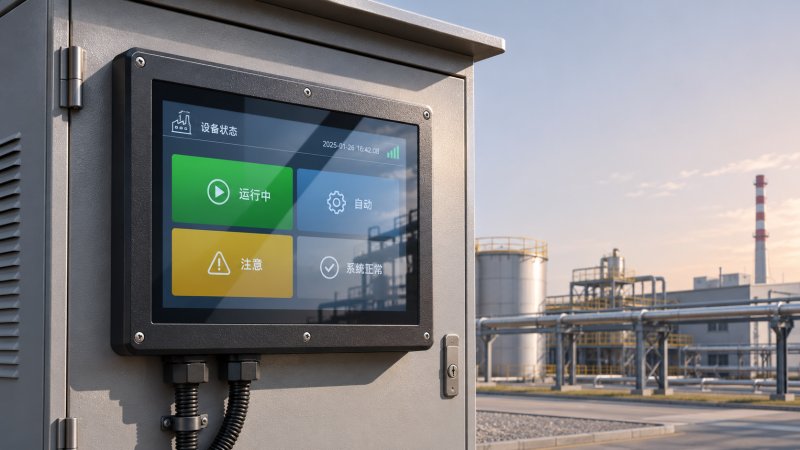
When comparing reflectivity figures, check whether they describe the finished monitor or only a glass sample. Surface coatings, touch sensors, protective windows, and bonding all affect the result. Measurement angle and wavelength range matter too; figures obtained under different conditions are not necessarily comparable.
Read the brightness specification carefully
The figure in a catalog may describe the bare LCD panel, while the operator sees light transmitted through a touch layer and cover glass. Those layers can reduce the luminance reaching the viewer. For a meaningful comparison, request the brightness of the assembled display, measured at the front surface with the intended configuration.
Also distinguish between a typical value and a guaranteed minimum. A typical rating can be useful for initial screening, but a procurement specification should make clear which value must be met and under what conditions. Ask whether brightness is measured at the center or across the screen, at what ambient temperature, and at which backlight setting.
Uniformity deserves attention on larger screens. A bright center does not help if controls near the edges are noticeably dimmer. Likewise, a display may be very bright when new but lose output as its backlight ages. The appropriate allowance depends on the required service life, operating hours, temperature, and the supplier’s supported lifetime data.
A useful specification therefore states more than “1,000 nits.” It identifies the configured product, measurement location, minimum or typical status, operating conditions, and any required brightness reserve over the planned life. Where the supplier cannot provide a guaranteed aged value, treat end-of-life readability as a validation and maintenance question rather than an assumed performance guarantee.
Contrast, viewing angle, and the operator’s actual position
A contrast ratio measured in a dark room describes a different situation from a display in sunlight. Outdoor readability depends on the combined effect of emitted image luminance and reflected ambient light. Ask for information about ambient-light contrast or reflected-light performance, including the test setup, rather than relying exclusively on the panel’s dark-room contrast ratio.
Viewing angle specifications also require interpretation. A panel may have a wide stated viewing angle while still showing color shifts or reduced contrast when viewed from the side. That matters at a pump station where an operator approaches from an angle, or on mobile equipment where seating position and vibration affect the line of sight.
Check the interface at the intended viewing distance and from the positions people will actually use. Review alarm text, historical trends, and controls near the screen edge. If polarized safety glasses are worn, test with them: depending on the display’s polarizer orientation and the viewing angle, the image can become substantially darker.
Heat can undo a high-brightness design
A brighter backlight generally consumes more power and produces more heat. Add solar loading, a sealed enclosure, and nearby equipment, and the temperature inside the assembly can exceed the surrounding air temperature. A display selected on its indoor specification may then dim to protect itself, shut down, or suffer accelerated component aging.
Check both the monitor’s operating temperature range and the temperature at which its maximum specified brightness can be sustained. These are not necessarily the same thing. Ask whether the unit uses thermal dimming, when it begins, and whether the resulting brightness remains adequate for the application. A specification without those conditions leaves a significant gap in the comparison.
The enclosure must be evaluated as a system. A sealed cabinet may protect against dust and water while restricting heat removal. Fans, vents, heat exchangers, and sunshields each introduce design and maintenance trade-offs. For an existing cabinet, verify the available power, airflow, mounting depth, and exposure before assuming that a higher-brightness replacement will be a straightforward retrofit.
Cold conditions deserve a separate check. LCD response can slow at low temperatures, and startup behavior may differ from normal operation. Confirm the required operating and storage limits for the complete unit, including any heater or other conditioning equipment used in the proposed installation.
Automatic dimming is useful, but only if it behaves predictably
A screen that is readable at noon can be uncomfortably bright after dark. Automatic brightness control can adapt the backlight to changing conditions and avoid running at maximum output unnecessarily. Its value depends on sensor placement and control behavior, not simply on the presence of an “auto” setting.
A sensor shaded by the enclosure while the screen remains sunlit may select too low a setting. Rapid changes caused by passing shadows can also produce distracting fluctuations. During evaluation, check the minimum and maximum settings, response to changing light, manual override options, and behavior if the sensor fails or becomes dirty.
For installations used at night, confirm that dimming goes low enough without making alarms unreadable. Interface design remains part of the solution: brightness cannot compensate for small text, weak color contrast, or alarm states conveyed only by color.
Protection and compliance are separate from visibility
Outdoor service may expose a monitor to rain, dust, washdown, salt, ultraviolet radiation, impact, or chemicals. An enclosure protection rating should be checked against the actual exposure and installation orientation. Pay particular attention to whether the rating applies to the front face only or to the entire enclosure, and whether it remains valid after cable glands and mounting hardware are installed.
Touch operation adds another layer of evaluation. Gloves, water on the screen, and cleaning chemicals can affect usability or durability. Ask for the approved cleaning methods and test the intended gloves and operating conditions on the proposed cover glass, not on a generic demonstration unit.
Where a monitor will be installed in a potentially explosive atmosphere, sunlight readability does not establish suitability for that location. The complete equipment and installation must be assessed against the applicable hazardous-area classification and relevant local requirements. Where ATEX or IECEx documentation is relevant, verify the scope, conditions of use, and exact equipment configuration rather than assuming that a component certificate covers the finished system.
A practical way to compare suppliers
Start with a common set of project conditions: screen size, mounting orientation, exposure, viewing distance, expected operating hours, interface content, and temperature range. Then ask each supplier to respond for the same assembled configuration. This prevents a bare-panel brightness figure from being compared with a finished monitor’s measured output.
A useful technical review should resolve these questions:
- Is front-of-screen luminance specified as a minimum or a typical value, and is it measured through the intended touch and cover layers?
- What reflectivity or ambient-light contrast information is available for the finished assembly, and under what measurement conditions?
- Can the display sustain the required output at the expected enclosure temperature and solar exposure, or will thermal dimming occur?
- What are the service arrangements for the backlight, bonded screen, cover glass, and other components likely to affect lifetime readability?
- Are protection ratings, hazardous-area documentation where applicable, and installation instructions valid for the exact configuration being purchased?
If possible, assess a representative unit at the installation site or in a controlled test that reproduces the relevant light, temperature, viewing angle, and operator task. Include the real interface and allow the monitor and enclosure to reach a stable operating temperature. A brief inspection of a new screen indoors cannot reveal how it performs after prolonged exposure to heat or how reflected sunlight obscures a critical alarm.
Global Instrument Hub’s instrumentation and supplier-research focus offers a useful framework for this decision: compare documented performance in the intended application, not headline claims in isolation. For direct sun, use 1,000 nits as an initial benchmark, then confirm the assembled display’s optical performance, sustained output, environmental suitability, and service requirements before finalizing the specification.
Recommended for You
 How does multi component monitoring detect gases in stack emissions?Discover how multi component monitoring detects stack gases, manages interference and supports reliable emissions reporting. Explore key CEMS selection factors.
 How bright should an industrial monitor be for outdoor use?Choosing an outdoor industrial monitor? Learn why 1,000 nits is a starting point and how glare, contrast, and heat affect sunlight readability.
 How does water vapor affect infrared gas analyzers?Infrared gas analyzers can be affected by humidity, condensation and spectral interference. Learn how to protect sample integrity and achieve reliable results.
 How to reduce customer support response timesReduce Customer Support response times with actionable tips for reporting equipment faults, choosing the right channel, and getting expert help faster.
 How to choose a low range analyzer for trace-level measurementsChoose the right low range analyzer for trace-level measurements. Compare detection limits, sampling, calibration and support to make a confident decision.
 How to choose combustible gas detectors for a specific gasChoose combustible gas detectors with confidence. Compare sensor technologies, gas response, calibration, placement, and certification for your application.
 How to choose an air quality analyzer for the pollutants you need to measureChoose an air quality analyzer with confidence. Compare pollutant measurement methods, sampling, accuracy and calibration to find the right fit for your needs.
 How to choose industrial metrology tools for tight tolerancesChoose industrial metrology tools for tight tolerances with confidence. Compare uncertainty, calibration, tool types, and costs to reduce inspection risk.
 How moisture affects fixed analyzer accuracy in stack gas monitoringImprove fixed analyzer accuracy in stack gas monitoring. Discover how moisture causes dilution, interference, and sample loss—and learn practical ways to protect emissions data.
 How does production line speed affect in-line measurement accuracy?Discover how production line speed affects in-line measurement accuracy. Explore sensor response, sampling, and timing to boost throughput without compromising quality.
 How condensation affects HCl concentration analyzer accuracyHCl concentration analyzer accuracy can suffer when condensation traps HCl. Learn how to spot sampling losses, prevent low readings, and improve measurement reliability.
 How does cross-interference affect multi-component gas analyzers?How does cross-interference affect multi component gas analyzers? Explore measurement errors, compensation limits, and validation tips to choose the right system for your process.
 How does temperature affect high-accuracy sensor performance?Explore how temperature affects high accuracy sensor performance. Learn to reduce thermal drift, evaluate compensation, and select the right sensor for reliable measurements.
 Can a C4H8O concentration analyzer distinguish between isomers?Can a C4H8O concentration analyzer distinguish isomers? Compare GC, FTIR and MS methods, uncover selectivity limits, and learn what to validate before choosing your instrument.
 How to identify a reliable supplier using on-time delivery recordsIdentify a Reliable Supplier by verifying on-time delivery records, original commitments, and complete shipments. Learn practical checks to reduce purchasing risk and protect your project schedule.
 How sensitive should a portable hydrogen analyzer be for lab use?Choose a portable hydrogen analyzer for laboratory use with the right quantification limit, accuracy, and range. Learn how to verify performance and avoid costly buying mistakes.
 How to set industrial calibration intervals based on equipment riskSet industrial calibration intervals based on equipment risk, drift, and as-found data. Learn when to shorten or extend schedules to improve reliability and avoid unnecessary costs.
 How to choose electrochemical analyzers for low-current measurementsCompare electrochemical analyzers for precise low-current measurements. Learn how noise, leakage, bandwidth, and real-cell testing help you choose the right instrument.
 What tolerance does a custom gas mixture need for calibration?Choose the right custom gas tolerance for calibration. Learn how blending tolerance, certified uncertainty, and stability affect accuracy—and avoid paying for precision you don’t need.
 How condensation affects stack detector readings in wet flue gasStack detector readings can drift when wet flue gas condenses. Learn how to identify moisture interference, prevent sample losses, and improve emissions monitoring reliability.
 How to prevent condensation in a CO2 analyzer sampling systemPrevent condensation in your CO2 analyzer sampling system. Learn how to control dew point, eliminate cold spots, and manage moisture for reliable readings and fewer costly disruptions.
 How to verify accuracy claims for industrial quality analyzersVerify accuracy claims for industrial quality analyzers with calibration checks, independent testing, and clear acceptance criteria. Learn how to reduce risk and buy with confidence.
 How to calculate cooling loads for an industrial analyzer shelterSize industrial analyzer shelter cooling with confidence. Learn to calculate equipment heat, solar gains, and ventilation loads, then select HVAC capacity for reliable analyzer performance.
 Hydrogen Analyzers for Energy Storage: Purity Monitoring vs. Leak DetectionChoosing a hydrogen analyzer for energy storage systems? Compare purity monitoring and leak detection to select the right sensors, improve safety, and protect fuel cell performance.
 NH3 Monitoring in Fertilizer Plants: Where Should Leak Analyzers Be Installed?NH3 analyzer for fertilizer production: discover where to place leak detectors around storage, compressors, and loading areas to reduce blind spots and improve early warning.
 Diesel Engine NOx Analyzers: Response Time and NO2 Conversion ExplainedChoosing a NOX analyzer for diesel engines? Learn how response time, NO2 conversion, and sampling design affect accuracy—and make a smarter, evidence-based purchase.
 SO2 Analyzers for Smelter Emissions: Sampling Hot, Dust-Laden Flue GasSelect an SO2 analyzer for smelting industry applications. Discover how to handle hot, dust-laden flue gas, prevent sample losses, and achieve reliable emissions monitoring.
 Unstable CH4 Readings in Biogas Monitoring? Check Moisture and Sample FlowCH4 analyzer for biogas monitoring giving unstable readings? Discover how moisture, sample flow, and pressure checks help pinpoint faults and restore reliable methane measurements.
 Buying a CO2 Analyzer for Brewery Gas Recovery: Costs Beyond the Purchase PriceBuying a CO2 analyzer for brewery applications? Compare sampling, installation, calibration, and downtime costs to uncover hidden expenses and make a smarter gas recovery investment.
 Where to Place CO Analyzers for Effective Parking Garage VentilationOptimize your CO analyzer for parking garage ventilation with practical placement tips. Learn how sensor height, airflow, and zone coverage support timely detection and effective fan control.
 NDIR vs. FTIR Gas Analyzers: Which Fits Your Environmental Research?Find the right infrared gas analyzer for environmental research. Compare NDIR vs. FTIR on sensitivity, gas coverage, sampling needs, and cost to choose confidently for your study.
 Oxygen Analyzers for Diving: Calibration Checks Before Nitrox BlendingUsing an oxygen analyzer for diving applications? Discover essential calibration, sensor, and sampling checks before nitrox blending to support reliable readings.



Search Categories
Search Categories
- Smart Meters & Power Quality
- Transformer Gas Analyzers
- BESS Thermal Runaway Detectors
- Energy, Power & Smart Grid Monitoring
- Optical Profilers & CMM
- Ultrasonic & X-Ray NDT
- Calibration Standards
- Precision Metrology & NDT
- Water Quality Analyzers
- CEMS & VOCs Monitors
- Price Trends
- Import & Export Updates
- Market Trends
- Industry News
- Industry Insights
Latest Article
- How does multi component monitoring detect gases in stack emissions?Discover how multi component monitoring detects stack gases, manages interference and supports reliable emissions reporting. Explore key CEMS selection factors.Posted by:
- How bright should an industrial monitor be for outdoor use?Choosing an outdoor industrial monitor? Learn why 1,000 nits is a starting point and how glare, contrast, and heat affect sunlight readability.Posted by:
- How does water vapor affect infrared gas analyzers?Infrared gas analyzers can be affected by humidity, condensation and spectral interference. Learn how to protect sample integrity and achieve reliable results.Posted by:
Please give us a message
