Online Monitoring Systems: Common Failures and Fixes


Why do online monitoring systems fail even when the hardware looks fine?
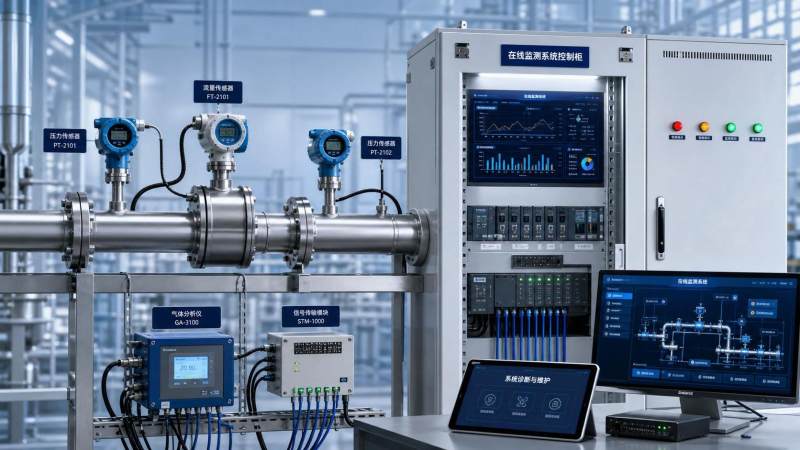 Online monitoring systems rarely collapse because of one dramatic event. More often, they drift into failure through small faults that stack together.
A healthy display can hide unstable signals, delayed transmission, sensor contamination, poor grounding, or wrong scaling inside the control layer.
In industrial manufacturing, energy, environmental monitoring, and laboratory support systems, this matters because bad data can look believable before it looks broken.
That is why troubleshooting online monitoring systems starts with data trust, not only device replacement.
A practical first check is to separate the failure into four layers: sensing, transmission, processing, and display or reporting.
- If the sensor value is wrong at source, calibration, fouling, aging, or installation error is likely.
- If the source is stable but the trend is noisy, wiring, shielding, power quality, or network interference becomes the main suspect.
- If field values and SCADA values differ, scaling, protocol mapping, and tag configuration need review.
- If reports are wrong but live values are correct, historian, database, or timestamp logic may be failing.
GIH often frames instrumentation as the sensory and nervous system of industrial operations. That view is useful during maintenance.
When the nervous system misreads pressure, flow, vibration, emissions, or composition, the process may keep running while decisions get worse.
Which symptoms usually point to the most common faults?
Not every alarm deserves the same response. The faster route is to match the symptom with the failure pattern behind it.
The table below works as a field reference for common online monitoring systems issues.
This pattern matters across CEMS, water quality analyzers, power monitoring, tank gauging, and condition monitoring platforms.
The mistake is assuming similar symptoms always have the same cause. A drifting oxygen analyzer and a drifting temperature input may need completely different fixes.
When the data cannot be trusted, where should diagnosis begin?
Begin at the measurement boundary. That means checking what the instrument actually sees before reviewing software logic.
In practice, online monitoring systems fail at interfaces: process to sensor, sensor to transmitter, transmitter to network, and network to application.
A disciplined sequence saves time:
- Confirm the process condition with an independent method.
- Read local diagnostics from the field device.
- Measure signal output at the terminal level.
- Review scaling, range, and engineering units in the controller.
- Check timestamps, packet loss, and historian integrity.
This order prevents a common maintenance trap: replacing expensive analyzers when the real issue is sample blockage, power ripple, or a misconfigured tag.
For pressure, level, and flow instruments, installation details often explain the fault. Impulse line blockage, trapped gas, vibration, and valve position are still frequent causes.
For emissions and water analysis, the sample path deserves equal attention. Condensation, filter loading, pump wear, and reagent quality can distort online monitoring systems long before an alarm appears.
GIH’s coverage of calibration practice and compliance standards also points to a broader lesson: a reading is only useful when traceability is defensible.
Are network and software problems becoming more common than sensor failures?
In many sites, yes. As online monitoring systems connect to PLC, DCS, edge gateways, historians, and cloud dashboards, failure modes multiply.
The sensor may work perfectly while the system still produces missing, delayed, duplicated, or misaligned data.
More connected architecture brings three recurring problems.
- Protocol translation errors between Modbus, HART, OPC UA, or proprietary gateways.
- Clock drift that breaks sequence analysis and root cause review.
- Cybersecurity changes that block ports, services, or remote polling after updates.
A useful check is to compare raw device values, controller tags, historian records, and report exports for the same time window.
If only one layer is wrong, the fault is usually digital rather than physical.
This is especially relevant in smart grid monitoring, remote pump stations, environmental compliance systems, and distributed utility assets.
Because GIH follows Industry 4.0 and intelligent upgrading trends, one practical takeaway stands out: maintenance now requires equal fluency in instrumentation behavior and data architecture.
What fixes actually reduce repeat failures instead of just clearing the alarm?
The strongest fixes change the maintenance routine, not only the part number.
If online monitoring systems fail repeatedly, the root cause usually sits in environment, configuration control, or maintenance timing.
Several actions consistently lower repeat trouble calls:
- Set maintenance intervals by process severity, not calendar habit alone.
- Record baseline values after calibration, cleaning, and component replacement.
- Standardize cable shielding, grounding, and enclosure sealing across similar assets.
- Control firmware, configuration backups, and change logs with the same discipline as spare parts.
- Verify sample system health during every analyzer service visit.
Shortcuts create expensive loops. For example, repeated pH sensor replacement will not solve unstable readings caused by improper sample flow or temperature compensation errors.
The same applies to vibration systems. Sensor swaps do little when mounting quality, cable routing, or machine speed references are inconsistent.
A useful habit is to close each fault with one documented answer to this question: what condition allowed this failure to happen twice?
How should maintenance teams prioritize upgrades, spares, and preventive checks?
Not every online monitoring systems asset deserves the same level of redundancy or spare stock.
A simple priority model works better than treating all failures as urgent.
Rate each point by process criticality, safety impact, compliance exposure, diagnostic visibility, and replacement lead time.
High-priority examples include emissions analyzers under reporting obligations, boiler safety transmitters, battery thermal monitoring, and pharmaceutical utility monitoring.
Lower-priority points may still matter operationally, but they can tolerate longer calibration windows or shared spares.
This is where market intelligence also helps. GIH’s supply chain perspective is relevant because failure recovery depends on parts availability, certification fit, and vendor support depth.
Before upgrading, confirm these points:
- Whether the current fault is design-related or simply neglected maintenance.
- Whether the replacement will integrate with existing PLC, DCS, or historian platforms.
- Whether calibration traceability, ATEX, IECEx, or other compliance needs will change.
- Whether lead time risk is greater than repair complexity.
A disciplined upgrade plan turns online monitoring systems from reactive assets into stable decision tools.
What is the most practical next step after a recurring failure?
Start with one failure history, not the whole plant. Pull alarms, calibration records, spare usage, and communication logs for a single troublesome loop.
Then rebuild the event chain from process condition to final report. That usually shows whether the weakness is sensing, transmission, software, or maintenance planning.
Online monitoring systems support safe production only when data stays measurable, traceable, and explainable.
The most reliable improvements usually come from tighter diagnostics, cleaner configuration control, and service intervals matched to real operating stress.
For the next review cycle, build a shortlist of recurring faults, rank them by operational impact, and verify each one against field evidence before planning parts, upgrades, or vendor comparisons.
Recommended for You
 How bright should an industrial monitor be for outdoor use?Choosing an outdoor industrial monitor? Learn why 1,000 nits is a starting point and how glare, contrast, and heat affect sunlight readability.
 How does water vapor affect infrared gas analyzers?Infrared gas analyzers can be affected by humidity, condensation and spectral interference. Learn how to protect sample integrity and achieve reliable results.
 How to reduce customer support response timesReduce Customer Support response times with actionable tips for reporting equipment faults, choosing the right channel, and getting expert help faster.
 How to choose a low range analyzer for trace-level measurementsChoose the right low range analyzer for trace-level measurements. Compare detection limits, sampling, calibration and support to make a confident decision.
 How to choose combustible gas detectors for a specific gasChoose combustible gas detectors with confidence. Compare sensor technologies, gas response, calibration, placement, and certification for your application.
 How to choose an air quality analyzer for the pollutants you need to measureChoose an air quality analyzer with confidence. Compare pollutant measurement methods, sampling, accuracy and calibration to find the right fit for your needs.
 How to choose industrial metrology tools for tight tolerancesChoose industrial metrology tools for tight tolerances with confidence. Compare uncertainty, calibration, tool types, and costs to reduce inspection risk.
 How moisture affects fixed analyzer accuracy in stack gas monitoringImprove fixed analyzer accuracy in stack gas monitoring. Discover how moisture causes dilution, interference, and sample loss—and learn practical ways to protect emissions data.
 How does production line speed affect in-line measurement accuracy?Discover how production line speed affects in-line measurement accuracy. Explore sensor response, sampling, and timing to boost throughput without compromising quality.
 How condensation affects HCl concentration analyzer accuracyHCl concentration analyzer accuracy can suffer when condensation traps HCl. Learn how to spot sampling losses, prevent low readings, and improve measurement reliability.
 How does cross-interference affect multi-component gas analyzers?How does cross-interference affect multi component gas analyzers? Explore measurement errors, compensation limits, and validation tips to choose the right system for your process.
 How does temperature affect high-accuracy sensor performance?Explore how temperature affects high accuracy sensor performance. Learn to reduce thermal drift, evaluate compensation, and select the right sensor for reliable measurements.
 Can a C4H8O concentration analyzer distinguish between isomers?Can a C4H8O concentration analyzer distinguish isomers? Compare GC, FTIR and MS methods, uncover selectivity limits, and learn what to validate before choosing your instrument.
 How to identify a reliable supplier using on-time delivery recordsIdentify a Reliable Supplier by verifying on-time delivery records, original commitments, and complete shipments. Learn practical checks to reduce purchasing risk and protect your project schedule.
 How sensitive should a portable hydrogen analyzer be for lab use?Choose a portable hydrogen analyzer for laboratory use with the right quantification limit, accuracy, and range. Learn how to verify performance and avoid costly buying mistakes.
 How to set industrial calibration intervals based on equipment riskSet industrial calibration intervals based on equipment risk, drift, and as-found data. Learn when to shorten or extend schedules to improve reliability and avoid unnecessary costs.
 How to choose electrochemical analyzers for low-current measurementsCompare electrochemical analyzers for precise low-current measurements. Learn how noise, leakage, bandwidth, and real-cell testing help you choose the right instrument.
 What tolerance does a custom gas mixture need for calibration?Choose the right custom gas tolerance for calibration. Learn how blending tolerance, certified uncertainty, and stability affect accuracy—and avoid paying for precision you don’t need.
 How condensation affects stack detector readings in wet flue gasStack detector readings can drift when wet flue gas condenses. Learn how to identify moisture interference, prevent sample losses, and improve emissions monitoring reliability.
 How to prevent condensation in a CO2 analyzer sampling systemPrevent condensation in your CO2 analyzer sampling system. Learn how to control dew point, eliminate cold spots, and manage moisture for reliable readings and fewer costly disruptions.
 How to verify accuracy claims for industrial quality analyzersVerify accuracy claims for industrial quality analyzers with calibration checks, independent testing, and clear acceptance criteria. Learn how to reduce risk and buy with confidence.
 How to calculate cooling loads for an industrial analyzer shelterSize industrial analyzer shelter cooling with confidence. Learn to calculate equipment heat, solar gains, and ventilation loads, then select HVAC capacity for reliable analyzer performance.
 Hydrogen Analyzers for Energy Storage: Purity Monitoring vs. Leak DetectionChoosing a hydrogen analyzer for energy storage systems? Compare purity monitoring and leak detection to select the right sensors, improve safety, and protect fuel cell performance.
 NH3 Monitoring in Fertilizer Plants: Where Should Leak Analyzers Be Installed?NH3 analyzer for fertilizer production: discover where to place leak detectors around storage, compressors, and loading areas to reduce blind spots and improve early warning.
 Diesel Engine NOx Analyzers: Response Time and NO2 Conversion ExplainedChoosing a NOX analyzer for diesel engines? Learn how response time, NO2 conversion, and sampling design affect accuracy—and make a smarter, evidence-based purchase.
 SO2 Analyzers for Smelter Emissions: Sampling Hot, Dust-Laden Flue GasSelect an SO2 analyzer for smelting industry applications. Discover how to handle hot, dust-laden flue gas, prevent sample losses, and achieve reliable emissions monitoring.
 Unstable CH4 Readings in Biogas Monitoring? Check Moisture and Sample FlowCH4 analyzer for biogas monitoring giving unstable readings? Discover how moisture, sample flow, and pressure checks help pinpoint faults and restore reliable methane measurements.
 Buying a CO2 Analyzer for Brewery Gas Recovery: Costs Beyond the Purchase PriceBuying a CO2 analyzer for brewery applications? Compare sampling, installation, calibration, and downtime costs to uncover hidden expenses and make a smarter gas recovery investment.
 Where to Place CO Analyzers for Effective Parking Garage VentilationOptimize your CO analyzer for parking garage ventilation with practical placement tips. Learn how sensor height, airflow, and zone coverage support timely detection and effective fan control.
 NDIR vs. FTIR Gas Analyzers: Which Fits Your Environmental Research?Find the right infrared gas analyzer for environmental research. Compare NDIR vs. FTIR on sensitivity, gas coverage, sampling needs, and cost to choose confidently for your study.
 Oxygen Analyzers for Diving: Calibration Checks Before Nitrox BlendingUsing an oxygen analyzer for diving applications? Discover essential calibration, sensor, and sampling checks before nitrox blending to support reliable readings.
 How Paramagnetic Oxygen Analyzers Work and Why Sample Pressure MattersLearn how a paramagnetic oxygen analyzer works, why sample pressure affects accuracy, and what to check in compensation and calibration before choosing your system.


Search Categories
Search Categories
- Smart Meters & Power Quality
- Transformer Gas Analyzers
- BESS Thermal Runaway Detectors
- Energy, Power & Smart Grid Monitoring
- Optical Profilers & CMM
- Ultrasonic & X-Ray NDT
- Calibration Standards
- Precision Metrology & NDT
- Water Quality Analyzers
- CEMS & VOCs Monitors
- Price Trends
- Import & Export Updates
- Market Trends
- Industry News
- Industry Insights
Latest Article
- How bright should an industrial monitor be for outdoor use?Choosing an outdoor industrial monitor? Learn why 1,000 nits is a starting point and how glare, contrast, and heat affect sunlight readability.Posted by:
- How does water vapor affect infrared gas analyzers?Infrared gas analyzers can be affected by humidity, condensation and spectral interference. Learn how to protect sample integrity and achieve reliable results.Posted by:
- How to reduce customer support response timesReduce Customer Support response times with actionable tips for reporting equipment faults, choosing the right channel, and getting expert help faster.Posted by:
Please give us a message