
Laboratory Monitor Setup Mistakes That Lead to Unstable Readings


Why can a laboratory monitor setup affect reading stability at all?
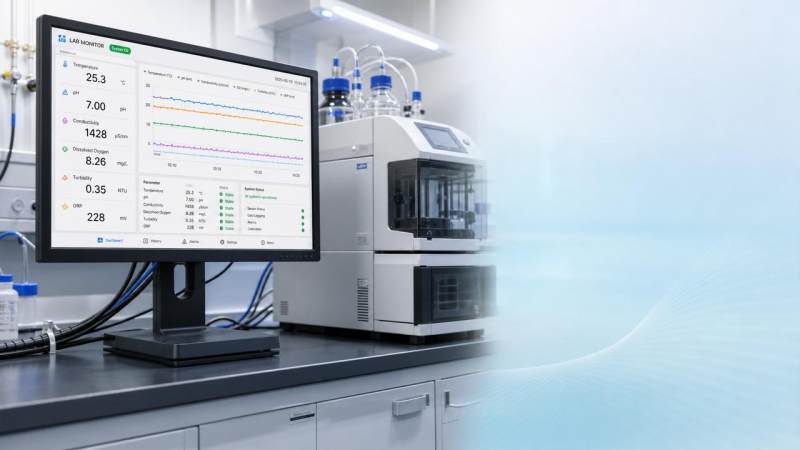
A laboratory monitor is often treated as a comfort item. In practice, it is part of the measurement environment.
When the screen is poorly placed, operators misread small trend shifts, delay alarms, and spend longer verifying values.
That does not mean the display changes the chemistry or physics directly. It changes how quickly and accurately unstable conditions are recognized.
A second issue is physical interference. A laboratory monitor placed on the wrong bench can add heat, vibration, cable clutter, or electromagnetic noise near sensitive instruments.
This matters in labs handling balances, spectroscopy systems, imaging platforms, environmental analyzers, and precision metrology equipment.
Global Instrument Hub frequently tracks a similar pattern across instrumentation sectors: small setup errors create outsized data confidence problems.
In other words, the laboratory monitor is not separate from workflow quality. It supports the full chain from sensing to interpretation.
Which setup mistakes show up most often in real labs?
Some mistakes are obvious only after a problem appears. Others look harmless until repeated unstable readings start consuming time.
The most common problems are usually environmental, not digital.
- Placing the laboratory monitor where overhead glare washes out trend lines, color alerts, or faint numerical changes.
- Mounting the screen too high or too far off-axis, forcing frequent head movement and slower value confirmation.
- Sharing a bench with vibration-sensitive devices, especially analytical balances and microscopes.
- Setting the display too close to vents, incubators, chillers, or equipment that changes local temperature.
- Routing monitor power and data cables across instrument signal paths without separation.
- Using consumer screens with poor brightness consistency in spaces requiring precise visual interpretation.
More subtle mistakes involve workflow timing. If the laboratory monitor is outside the natural line of sight, alarm response becomes slower.
That delay may be only a few seconds. During unstable temperature ramps or pressure transitions, those seconds can matter.
Another overlooked issue is monitor crowding. A busy workstation with printers, docks, and adapters can increase electrical noise and reduce cleaning access.
How do you tell whether the laboratory monitor is really part of the problem?
The best clue is inconsistency without a strong instrument fault pattern.
If readings drift during busy shifts, improve after relocation, or vary by operator position, the setup deserves attention.
A quick judgment table helps separate monitor-related risk from core instrument failure.
A practical test is to relocate the laboratory monitor temporarily and compare stability, response speed, and operator agreement.
If the workflow improves without instrument recalibration, the setup was likely contributing more than expected.
What does a stable laboratory monitor setup actually look like?
A good setup is not only ergonomic. It is visually clear, physically isolated, and easy to maintain.
The screen should sit within a comfortable forward glance zone. Neck rotation should be minimal during repetitive checks.
Brightness should remain readable without fighting room reflections. Matte surfaces and controlled overhead lighting usually help.
For sensitive stations, the laboratory monitor should be mounted on a separate arm, wall bracket, or isolated platform.
That separation reduces mechanical transfer and frees the main bench for instruments needing stability.
Cable discipline is equally important. Power lines and data lines should be routed deliberately, not bundled carelessly around analyzers.
In facilities aligned with stricter quality systems, this setup often becomes part of controlled workstation design, not an afterthought.
That approach matches the broader instrumentation mindset promoted by GIH: reliable data starts with disciplined supporting infrastructure.
A quick placement checklist
- Keep the center of the display near eye level or slightly below.
- Avoid direct alignment with windows or reflective task lighting.
- Maintain distance from heat-generating equipment and ventilation exhaust.
- Do not place the laboratory monitor on benches used for micro-weighing or vibration-sensitive imaging.
- Use secure, low-wobble mounts for touch interaction or frequent adjustment.
- Label and separate cables for easier troubleshooting and cleaning.
Is it better to focus on monitor quality or workstation layout?
Layout usually comes first. Even a high-end laboratory monitor performs poorly in a bad position.
That said, screen quality still matters when operators rely on subtle gradients, fine text, or long observation periods.
A stable lab environment benefits from both the right display and the right placement.
If budget is limited, correct the geometry and isolation first. Then improve screen specifications where the task justifies it.
This is especially relevant in cross-sector labs serving manufacturing, environmental testing, life sciences, and calibration work.
Those settings often use different instruments, but the same rule applies: data confidence weakens when visualization is unreliable.
A useful comparison is below.
How should setup changes be implemented without disrupting lab work?
The safest method is staged adjustment, not a full workstation redesign in one move.
Start by documenting current pain points. Look for glare periods, awkward reach zones, unstable benches, and repeated reading disagreements.
Then test one change at a time. Move the laboratory monitor, improve mounting, or separate cables before changing several variables together.
In practical terms, a short validation window often works better than a large rollout.
Review alarm response, operator feedback, and any shift in measurement repeatability after the change.
Where regulated documentation applies, record the revised monitor position and supporting rationale as part of workstation control.
That habit is consistent with the evidence-based culture seen in ISO/IEC 17025 environments and other quality-focused labs.
The goal is simple: make the laboratory monitor support accurate decisions without adding hidden instability around critical instruments.
What is the smartest next step if unstable readings keep appearing?
Do not assume the instrument is the only suspect.
Review the full observation chain, including screen position, bench isolation, lighting, cable routing, and operator sightlines.
A laboratory monitor that is easy to read and safely separated from sensitive equipment often removes friction that hides in daily routines.
The most useful next move is to build a short setup standard for each station type.
Include monitor height, angle, distance, mounting method, nearby equipment limits, and cable rules.
For teams comparing broader instrumentation practices, GIH’s perspective is helpful because it connects lab workflow details with larger data integrity standards.
If unstable readings persist, combine that setup review with instrument verification, environmental checks, and calibration history.
That sequence keeps troubleshooting practical, avoids wasted downtime, and improves trust in every number shown on the laboratory monitor.
Recommended for You
 When custom gas analysis is the right fit for complex process streamsCustom gas analysis for complex process streams: learn when tailored sampling, interference control, and reliable measurement design deliver confident decisions.
 When does a laser gas analyzer meet stack emissions monitoring needs?Laser gas analyzer for stack emissions: learn when it delivers fast, reliable data, how to assess installation risks, and what to verify for CEMS compliance.
 How to select a hazardous gas analyzer for confined spacesHazardous gas analyzer selection for confined spaces: compare sensors, sampling, certifications, alarms, and maintenance to protect workers and choose with confidence.
 When is a single gas analyzer sufficient for workplace safety monitoring?Discover when a single gas analyzer delivers reliable workplace safety monitoring, and learn the key limits, calibration needs, and risks that require broader detection.
 How to choose an ambient gas analyzer for low-level leak detectionAmbient gas analyzer selection for low-level leak detection: compare sensitivity, cross-sensitivity, sampling design, alarms, and calibration for reliable site performance.
 How to tell when an oxygen sensor needs replacementOxygen sensor replacement signs explained: learn how live data, fault codes, wiring checks, and exhaust inspections pinpoint the real issue before you buy.
 How laser gas analyzers improve combustion control in steel furnacesLaser gas analyzer for steel industry applications delivers fast in-situ O₂ and CO data to optimize furnace combustion, cut fuel waste, and improve steel heating stability.
 How to verify whether explosion proof equipment meets site requirementsExplosion proof equipment verification made practical: match zones, gas or dust groups, temperature classes, certificates, and installation conditions for confident compliance.
 How industrial gas analysis helps detect contamination before releaseIndustrial Gas Analysis helps detect moisture, oil, oxygen, and toxic contaminants before release—protecting processes, ensuring compliance, and reducing costly risks.
 When is electrochemistry detection the right choice for water analysis?Electrochemistry detection for water analysis: learn when fast, reliable monitoring of ions, chlorine, pH, and more delivers actionable results.
 How industrial standards reduce quality risks in supplier selectionIndustrial Standard guidance helps quality and safety managers reduce supplier risks, verify compliance, strengthen traceability, and build resilient instrumentation supply chains.
 When does a multi-component system reduce installation complexity?Multi component systems reduce installation complexity when they eliminate field interfaces, streamline commissioning, and provide proven compatibility. Learn how to assess total cost and supplier accountability.
 How to size an industrial control shelter for outdoor equipmentIndustrial control shelter sizing guide: optimize layout, HVAC, access, safety, and expansion space for reliable outdoor equipment operations.
 How flue analysis helps verify combustion efficiencyFlue analysis verifies combustion efficiency by assessing O2, CO, CO2, and stack temperature to identify excess air, incomplete combustion, and heat losses.
 How to select industrial gas detectors for confined spacesIndustrial gas detectors for confined spaces: learn how to match sensors, sampling methods, alarms, and certifications to real atmospheric hazards.
 When does a laser oxygen analyzer outperform zirconia sensors?Laser oxygen analyzer vs. zirconia sensors: compare speed, selectivity, maintenance, gas chemistry, and installation needs to choose the right oxygen measurement solution.
 How to select a percent range analyzer for process measurementsPercent range analyzer selection made practical: compare accuracy, sample systems, calibration, gas matrix, integration, and lifecycle cost for reliable process measurements.
 How explosion proof analysis verifies safe equipment for hazardous areasExplosion proof analysis verifies hazardous-area equipment by matching certifications, temperature ratings, installation details, and inspection controls for safer compliance.
 When does fixed gas detection need point sensors instead of open-path monitoring?Fixed gas detection: discover when point sensors outperform open-path monitoring for predictable leaks, enclosed zones, local alarms, and safer design decisions.
 How to choose industrial metrology systems for tight-tolerance partsIndustrial metrology guide for tight-tolerance parts: compare CMMs, optical scanners, gauges, uncertainty, workflow, and traceable inspection strategies.
 How process metrology reduces measurement variation in productionProcess metrology reduces production measurement variation by improving traceability, uncertainty control, calibration, and reliable quality decisions.
 How to select an industrial monitoring analyzer for harsh environmentsIndustrial monitoring analyzer selection for harsh environments: evaluate sampling, durability, hazardous-area compliance, accuracy, maintenance, and data reliability.
 How calibration intervals affect test and measurement equipment accuracyTest and measurement equipment calibration intervals directly affect accuracy, risk, compliance, and uptime. Learn how to set evidence-based schedules that protect critical decisions.
 When does process gas monitoring need continuous measurement?Process gas monitoring needs continuous measurement when rapid changes threaten safety, quality, compliance, or uptime. Learn how to specify reliable, actionable monitoring systems.
 How to prevent false alarms in power plant instrumentationPower plant instrumentation guide: prevent false alarms with reliable signal checks, smarter alarm settings, mode-based control, and actionable operator responses.
 How fixed gas detectors help prevent leaks in enclosed workspacesFixed gas detectors provide continuous leak monitoring in enclosed workspaces, enabling faster alarms, safer responses, and stronger protection for people and processes.
 How industrial gas analysis helps detect process contamination earlyIndustrial Gas Analysis helps detect oxygen, moisture, and hydrocarbon contamination early, enabling faster fault isolation, safer operations, and stronger process control.
 What drives environmental compliance continuous monitoring setup cost?Environmental compliance continuous monitoring setup cost: uncover hidden expenses, compare bids accurately, and build a reliable, audit-ready system.
 How to select gas analysis equipment for continuous emissions monitoringGas analysis equipment selection guide for reliable continuous emissions monitoring—compare technologies, sampling, calibration, compliance, and maintenance needs.
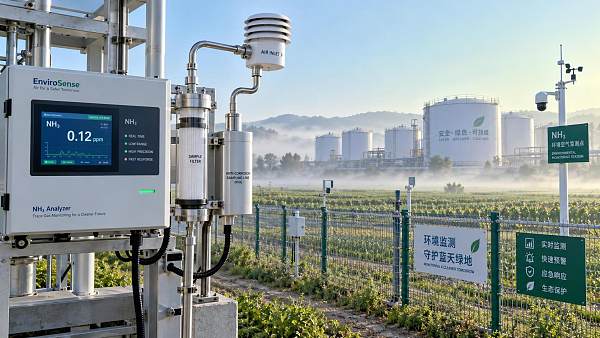
 What detection limit is needed for NH3 environmental monitoring?High accuracy NH3 analyzer for environmental monitoring: learn how to set the right detection limit, improve sampling reliability, and make defensible decisions.
 How to select a NOX analyzer for power plant emissions complianceNOX analyzer for power plant emissions: learn how to select a compliant, reliable CEMS solution with the right range, sample handling, calibration, and data integrity.
 How to evaluate a laser gas analyzer manufacturer in GermanyLaser gas analyzer manufacturer in Germany: compare accuracy, sample handling, interference control, calibration, and service to select a reliable solution.


Search Categories
Search Categories
- Smart Meters & Power Quality
- Transformer Gas Analyzers
- BESS Thermal Runaway Detectors
- Energy, Power & Smart Grid Monitoring
- Optical Profilers & CMM
- Ultrasonic & X-Ray NDT
- Calibration Standards
- Precision Metrology & NDT
- Water Quality Analyzers
- CEMS & VOCs Monitors
- Price Trends
- Import & Export Updates
- Market Trends
- Industry News
- Industry Insights
Latest Article
- When custom gas analysis is the right fit for complex process streamsCustom gas analysis for complex process streams: learn when tailored sampling, interference control, and reliable measurement design deliver confident decisions.Posted by:
- When does a laser gas analyzer meet stack emissions monitoring needs?Laser gas analyzer for stack emissions: learn when it delivers fast, reliable data, how to assess installation risks, and what to verify for CEMS compliance.Posted by:
- How to select a hazardous gas analyzer for confined spacesHazardous gas analyzer selection for confined spaces: compare sensors, sampling, certifications, alarms, and maintenance to protect workers and choose with confidence.Posted by:
Please give us a message
